
Over the last few years, we have modernised our Moodle infrastructure, introduced new approaches to designing Moodle modules, expanded our use of Microsoft 365, and brought in new technologies for assessment, feedback and student engagement. Explore has been updated to reflect that changing landscape.
Explore helps you understand what digital tools are available at Portsmouth, what they are good at, and how they can support different kinds of learning.
Your guide to digital teaching and learning
Discover the digital tools available at Portsmouth and find the right technologies to support your teaching, learning and assessment.
Explore is the University of Portsmouth's online guide to digital teaching and learning technologies for staff. It brings together information about the tools available across the University, helping you understand what they do, how they can be used and how they can enhance teaching, learning and assessment.
Whether you're looking for a particular technology or exploring new ways to engage students, support collaboration, provide feedback or assess learning, Explore can help you find the right tools for your teaching needs.
Ready to discover what's available? Visit Explore and find the technologies to support your teaching.

Find the right tool for your teaching
Discover what's available, what different tools can do and how they can support your teaching.
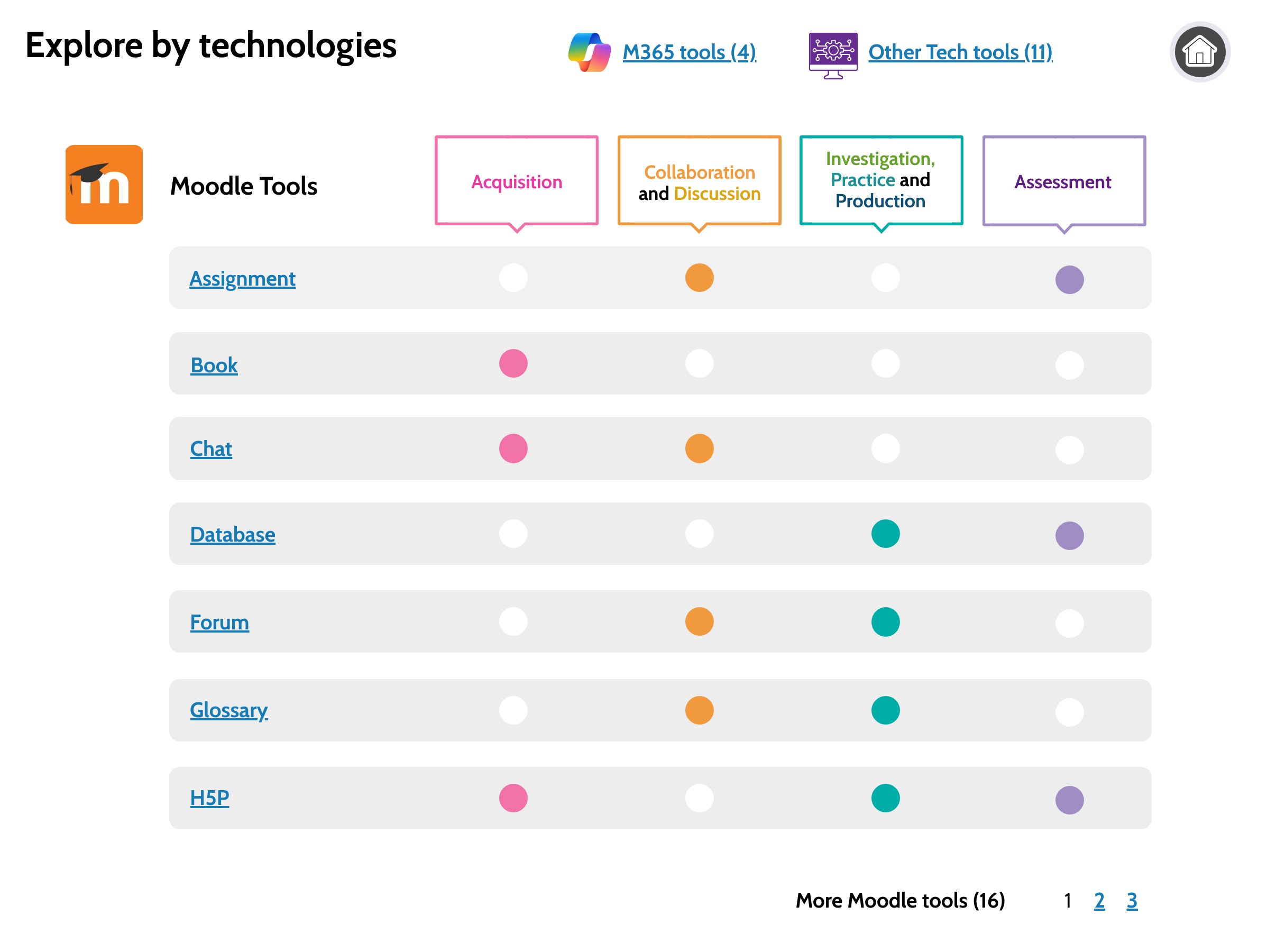
Already have a particular digital tool in mind? Explore by technologies allows you to browse the digital tools available to University staff.
Find out more about individual tools, including:
-
What the technology does – an overview of its purpose and main features.
-
How it can be used – examples of how it might support teaching, learning and assessment.
-
Learning and teaching applications – the types of activities and learning experiences it can support.
-
Related technologies – other tools you might consider for similar purposes.
Whether you're looking for information about Moodle activities, FeedbackFruits, Microsoft 365 or other University-supported technologies, this section helps you understand what's available and make informed choices about what to use.
Know the tool? Start here to find out more about what it can do.
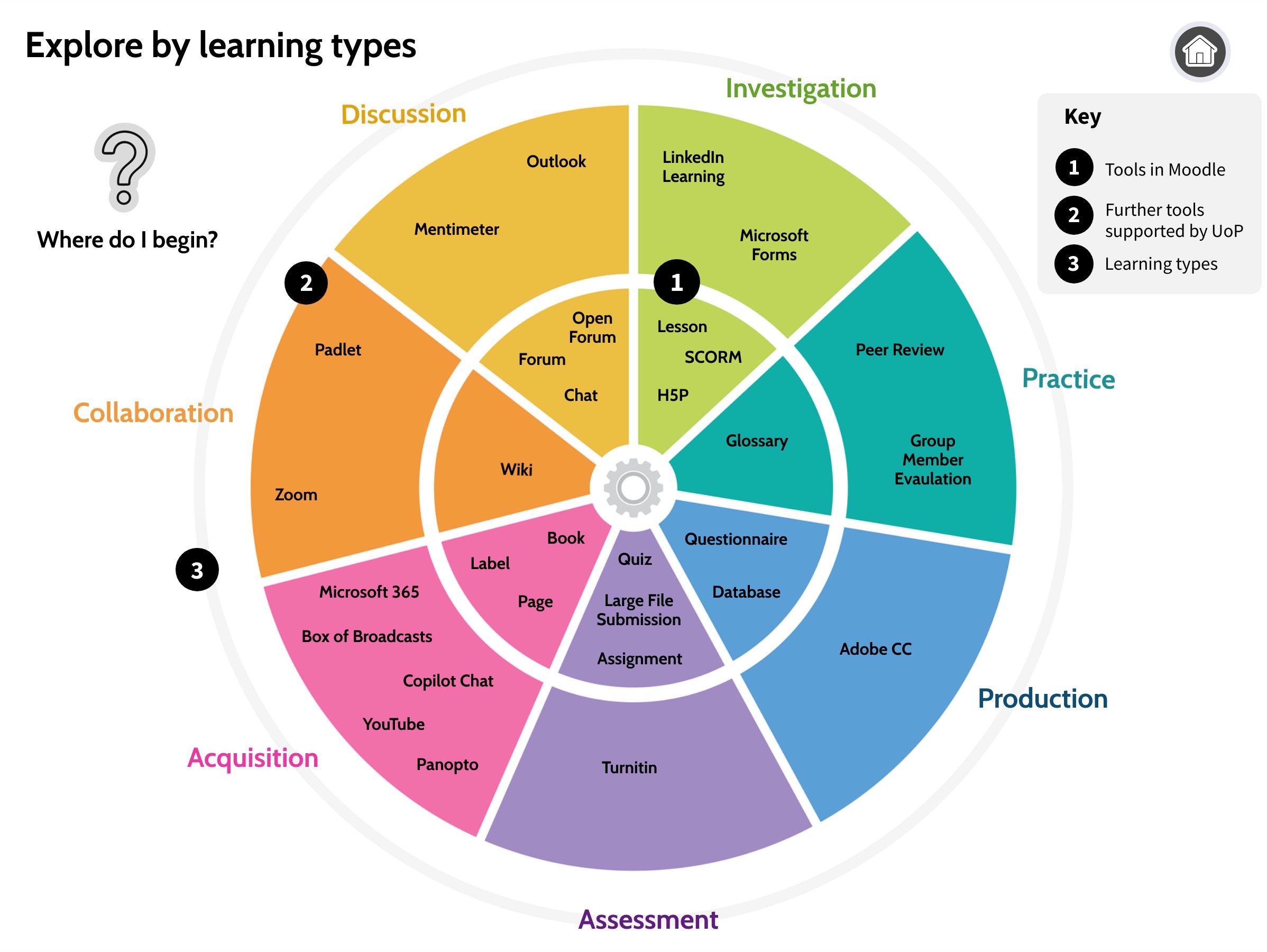
Not sure which digital tool you need? Start with what you want your students to learn or do.
Explore organises technologies around different learning activities, helping you identify tools that could support your teaching objectives and the student learning experience.
You can explore areas such as:
-
Acquisition – enable students to access, engage with and develop knowledge through digital learning resources.
-
Collaboration – encourage students to work together, share knowledge and build understanding through participation.
-
Discussion – enable students to exchange ideas, communicate perspectives and develop understanding through dialogue.
-
Investigation – support students to explore, research, compare, evaluate and critically analyse information and resources.
-
Practice – provide opportunities for students to develop skills, apply knowledge and improve through feedback and reflection.
-
Production – enable students to consolidate learning by creating, developing and presenting artefacts, products or other outcomes.
-
Assessment – support formative and summative assessment through feedback, reflection and evaluation to monitor and improve learning.
Each learning type highlights relevant technologies and helps you consider how they might be used in your teaching.
Start with the learning activity and discover the tools that could help you achieve it.
Why is our digital toolkit changing?
We're continuing to develop our digital learning environment through improvements to Moodle, greater use of Microsoft 365 and new technologies for assessment, feedback and student engagement.
Explore has been refreshed to reflect these changes and make it easier to find appropriate, supported technologies.
What's changing?
Some existing tools are being modernised or replaced, while new technologies are creating additional opportunities.
Moodle Workshop and Peer Assessment (retired Sept 2026)
From September 2026 FeedbackFruits Peer Review, Group Member Evaluation and Self Assessment tools replace legacy Moodle Workshop and Peer Assessment tools. Offering greatly improved feedback and assessment tools, including real-time formative feedback for students when writing feedback for their peers.
Large file submissions.
Launched in September 2026, large submissions up to 5Gb can now be made directly to Moodle assignments.
Safe Exam Browser (retired Jan 2026)
In January 2026, Respondus LockDown Browser replaced Safe Exam Browser. Respondus offers a much smoother, reliable online exam experience for students.
- FeedbackFruits Learning Conversations: new approaches to oral assessment.
- Moodle Module Assistant: clearer, more consistent module structures.
- Sharing Cart: easier reuse of Moodle resources.
- Assessment Information Resource (AIR): clearer assessment information for students.
- AI-supported innovation: exploring meaningful uses of AI in teaching and learning.
Find out more
Not every existing technology needs replacing, but some tools can be improved or better supported by newer alternatives.
We're reviewing our digital toolkit to make sure technologies are intuitive, sustainable and effective for staff and students. Where a better-supported alternative is available, we're moving towards it.
For example, FeedbackFruits offers a more intuitive approach to peer assessment, while Microsoft Lists is planned as a modern alternative for creating and sharing structured information.
Our aim is to improve the experience of teaching, learning and assessment, not simply to introduce newer technology.
The University's Modern Work Programme has improved personal productivity and as the project progresses, increasingly we'll have access to improved learning and teaching solutions.
However, this transition is being managed gradually. One of the biggest underpinning technologies to this digital transformation is the rollout of Microsoft Teams for students. Pilots are being conducted during term two of the 2026/27 academic year in collaboration with CADI and academic teams. These pilots will influence the wider rollout of MS Teams for students. MS Teams will give us much improved collaboration spaces alongside Moodle modules and help securely store our Microsoft based learning and teaching activities.
Explore will help you discover the Microsoft 365 tools available and understand how they might support your teaching. We'll add new Microsoft tools to Explore as these are launched more widely.
Moodle remains central to the University's digital learning environment. Our move to cloud infrastructure has created opportunities to improve the platform and develop new functionality.
Recent developments include:
-
Moodle Module Assistant: helps create clearer and more consistent module structures.
-
Sharing Cart: makes it easier to reuse resources between modules.
-
Improved module structures and activity signposting: support the Connected Curriculum and make learning activities clearer for students.
-
Moodle Assignment: supports the move away from USB-based examination submission.
We're combining Moodle's flexible open-source platform with our own development and pedagogic expertise to create a better digital learning experience.
Evolution, not technology for technology's sake
Newer doesn't automatically mean better. The right technology depends on what you want your students to learn or achieve.
Start with the learning activity, then find the technology to support it.
Need help or advice?
The Academic and Digital Innovation teams can provide further guidance and support with digital teaching tools.
Email: cadi-digital@port.ac.uk